Understanding your Right-Click Menu – Designations
A lot of OnCue's features are accessible in right-click menus for various files and work product. If you're ever in doubt about what you can with something–just right-click it.
Here is a list of articles that show all of the right-click menus in the program:
• Documents (including the Viewer pane with a document showing)
• Audiovisuals (including the Viewer pane with an audiovisual file showing)
• Transcripts (including the Transcript Viewer pane)
• Designations
• Media Scripts
• Notebooks
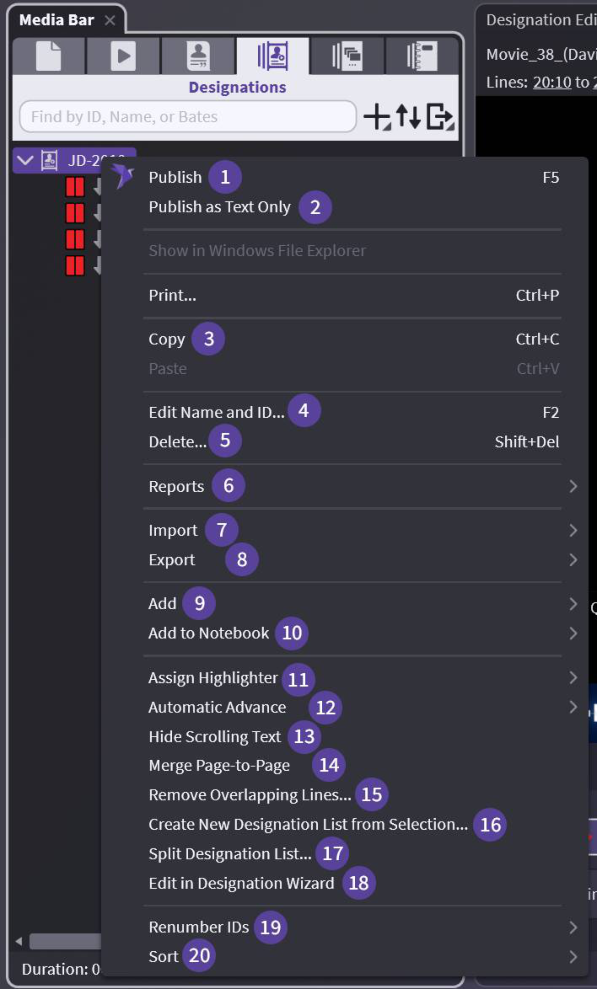
Designation List Level:
(1) Publish — Start playing the list in Presentation – will continue to intended stop
(2) Publish as Text Only — Start playing the scrolling text only (no video) in Presentation – will continue to intended stop
(3) Copy — Copy your entire list – into Notebook, Media Script, even another list
(4) Edit Name and ID... — As described - change the ID/Name of the Designation List
(5) Delete — Careful - no undo
(6) Reports — 3 options – See Deposition Designation Reports
(7) Import — All options for imports available – not tied to designations
(8) Export — See Exporting Designation Lists
(9) Add — Add to existing (list provided) or create new
(10) Add to Notebook — See Bates Numbering – Filling & Importing for options
(11) Assign Highlighter — As described - change highlighter for full list
(12) Automatic Advance — Change the way your designation list plays – auto or launch each clip one at time
(13) Hide — As described - Presentation mode
(14) Merge Page-to-Page — If a designation ends at the last line of a page and the next designation starts on the first line of the following page, this will merge them together (for example, 23:1-25 and 24:1-17 becomes 23:1-24:17)
(15) Remove Overlapping Lines... — Remove overlapping portions of designations. See Overlapping or Duplicate Designation Removal
(16) Create New Designation List from Selection... — Create new list from existing list
(17) Split Designation List... — Breaks up your list – See Split Designation List
(18) Edit in Designation Wizard — Opens your list in the Wizard
(19) Renumber IDs — Move designations, sort or delete – Keep your IDs consecutive using this
(20) Sort — Many options – See Sorting Designations Lists
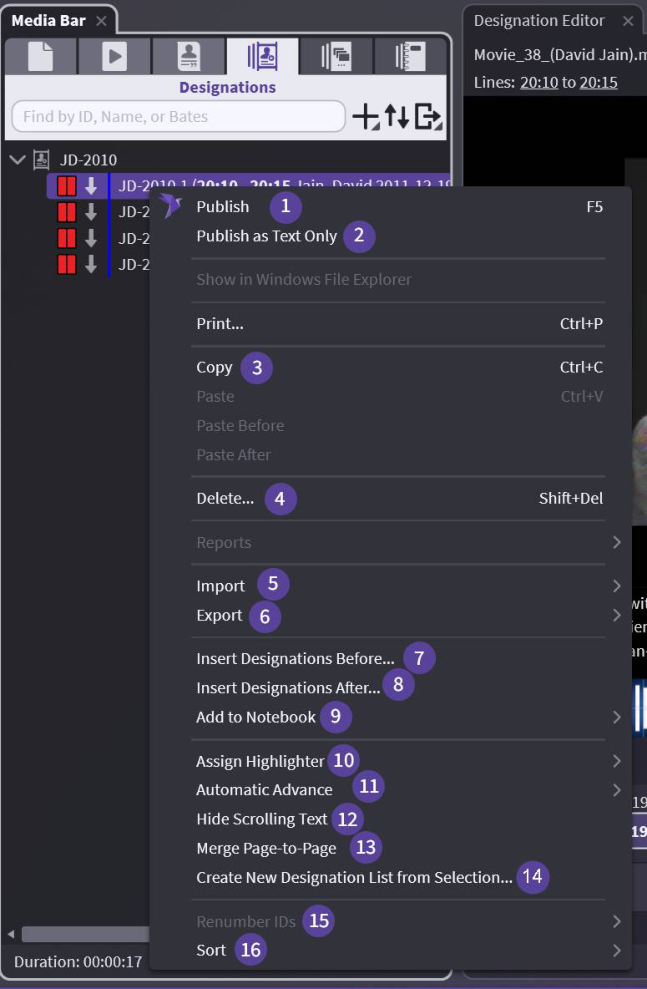
Designation Clip Level:
Copy selected designation – into Notebook, Media Script, even another list
(4) Delete
(5) Import
(6) Export
(7) Insert Designations Before... — Insert before existing designation by typing
(8) Insert Designations After... — Insert after existing designation by typing
(9) Add to Notebook — Selected designations copied to notebook or create a new notebook
(10) Assign Highlighter — As described – change selected designations
(11) Automatic Advance — Change the way your designation plays – turning off (left) – stop after that designation
(12) Hide Scrolling Text — As described - Presentation Mode
(13) Merge Page-to-Page
(14) Create New Designation List from Selection...
(15) Renumber IDs
(16) Sort
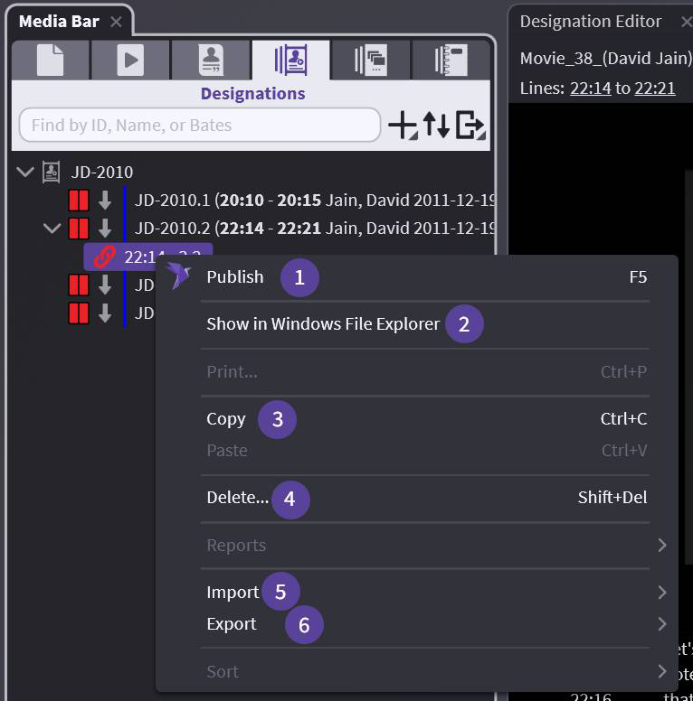
Designation Link Level:
Start playing in presentation from selected designation – will continue to intended stop
(2) Show in Windows File Explorer — As described – opens file location in Windows — Copy selected link to paste into another designation