Understanding your Right-Click Menu – Notebooks
A lot of OnCue's features are accessible in right-click menus for various files and work product. If you're ever in doubt about what you can with something–just right-click it.
Here is a list of articles that show all of the right-click menus in the program:
• Documents (including the Viewer pane with a document showing)
• Audiovisuals (including the Viewer pane with an audiovisual file showing)
• Transcripts (including the Transcript Viewer pane)
• Designations
• Media Scripts
• Notebooks
Note: All individual notebook elements follow the right-click options for those elements (document, designation or audiovisual).
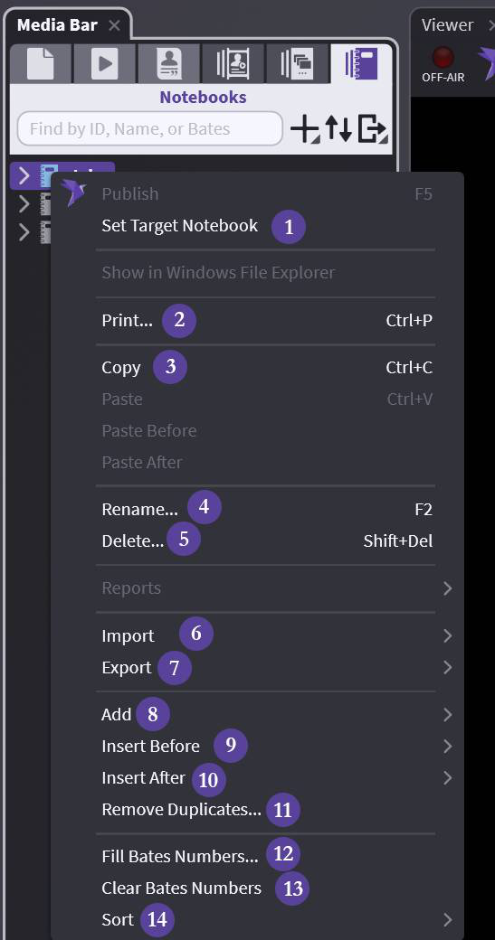
Main Notebook:
(1) Set Target Notebook — Set your CTRL + B default – See Target Notebooks
(2) Print — Exactly as described – see Printing for options
(3) Copy — Copy your entire Notebook and paste – into a Notebook or Media Script
(4) Rename — Exactly as described
(5) Delete — Careful - no undo
(6) Import — All options for imports available - not tied to Notebooks
(7) Export — All options available
(8) Add — Lots of options – including adding elements to notebook by typing ID
(9) Insert Before — Insert New Notebook before existing
(10) Insert After — Insert New Notebook after existing
(11) Remove Duplicates... — Removes duplicates from notebook
(12) Fill Bates Numbers... — Fill bates numbers for items in the Notebook
(13) Clear Bates Numbers — Clears bates numbers for items in the Notebook
(14) Sort — Many options – See Sorting Designation Lists