OnCue Hotkeys
OnCue offers a fully customizable set of hotkeys that can be modified from the Preferences window. Simply double-click on the command you would like to change and assign it a new hotkey. Under Options in the lower left corner, click 'Reset to Defaults' to reset all hotkeys to their default values.
A printable version of the Hotkey Reference Guide including your changes can be found inside OnCue under the Help Menu.
Note: All hotkeys below are program defaults. Any hotkey that is blank means that you have the ability to assign a hotkey to that function, but it does not have a hotkey set by default.
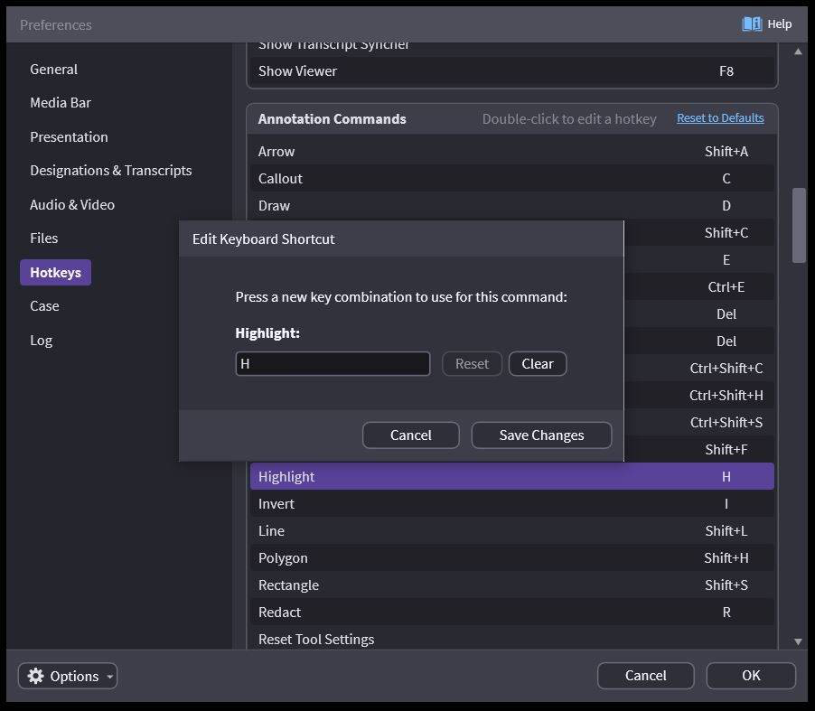
General Commands
Add Bates Numbers
Clear Recent Cases
Clear Viewer = Esc
Collapse Tab = Ctrl + F9
Delete = Shift + Del (only deletes from the database)
Deskew Pages
Edit Highlighters
Export Images Export Media
Export Video
Find in Media Bar = Ctrl + F
New Case = Ctrl + N
Open Case = Ctrl + O
Open Last Case = Ctrl + L
Optimize Media
Print = Ctrl + P
Reload Case = F9
Remove Bates Numbers
Rename = F2
Renumber IDs
Reset Settings
Show All Designations in New Tab = Alt + 1
Show All Media Scripts in New Tab = Alt + 2
Show All Notebooks in New Tab = Alt + 3
Show All Timelines in New Tab
Show Database Tools
Show Designation Dashboard = F6
Show Designation Editor = F7
Show Designation Wizard
Show Log = F12
Show Preferences
Show Properties = F4
Show Selected Designation in New Tab = Shift + Alt + 1
Show Selected Media Script in New Tab = Shift + Alt + 2
Show Selected Notebook in New Tab = Shift + Alt + 3
Show Selected Timelines in New Tab
Show Transcript Sync Utility
Show Viewer = F8 Unmark as Admitted
Annotation Commands
Arrow = Shift + A
Callout = C
Draw = D
Ellipse = Shift + C
Erase All = E
Erase Last Annotation = Ctrl + E
Eralse Last Annotation (Alternate) = Del
Erase Selected = Del
Filled Ellipse = Ctrl + Shift + C
Filled Polygon = Ctrl + Shift + H
Filled Rectangle = Ctrl + Shift + S
Freehand = Shift + F
Highlight = H
Invert = I
Line = Shift + L
Polygon = Shift + H
Rectangle = Shift + S
Redact = R
Reset Tool Settings
Save Annotations = Ctrl + S
Save Annotations (Alternate) = M
Set Color #0 = Shift + )
Set Color #1 = Shift + !
Set Color #2 = Shift + @
Set Color #3 = Shift + #
Set Color #4 = Shift + $
Set Color #5 = Shift + %
Set Color #6 = Shift + ^
Set Color #7 = Shift + &
Set Color #8 = **Shift + ***
Set Color #9 = Shift + (
Text = Shift + T
Update Annotations = Ctrl + U
Designation Commands
Add Selection = Ctrl + S
Clear Linked Media = Ctrl + F (returns video to full screen and hides a document in Presentation)
Hide/Show Scrolling Text = T (Show/Hide scrolling text in Presentation and ON-AIR)
Hide/Show Video = Shift + V
Preview Tune Position = Ctrl + Space
Save Tune Position = Enter
Save Tune Point and Select Next = Ctrl + Enter Toggle Link Split-screen = Ctrl + Shift + F
Media Commands
Add Document to Target Notebook = Alt + B
Add to Target Notebook = Ctrl + B
Crop Zoom = Shift + Z
Full Height = F
Full Width = W
Full Width at Bottom of Page = Shift + W
Nudge Clockwise = Shift + ]
Nudge Counterclockwise = Shift + [
Pan = S
Preload Media = Alt + X (loads media into memory so calling it up with "X + <ID>" will display it instantly–works ON-AIR, OFF-AIR, in Viewer and in Presentation)
Remap Media Files
Reset Zoom
Rotate Clockwise = ]
Rotate Counterclockwise = [ Scroll Text Downward = ↓ Scroll Text Upward = ↑
Scroll to Bottom = PgDn
Scroll to Top = PgUp
Select = A
Select Next Pane = Tab
Select Next Pane (Alternate) = =
Select Previous Pane = Shift + Tab
Show First = Home
Show Last = End Show Media = X
Show Next = →
Show Next (Alternate) = .
Show Next ID = Shift + .
Show Next in All Panes = Ctrl + →
Show Next Saved Annotation = ↓
Show Next Scene = Alt + →
Show Previous = ←
Show Previous (Alternate) = Comma
Show Previous ID = Shift + Comma
Show Previous in All Panes = Ctrl + ←
Show Previous Saved Annotation = ↑
Show Previous Scene = Alt + ←
Split Horizontal = **
Split Horizontal w/ Next Page = *Ctrl + *
Split Vertical = /
Split Vertical w/ Next Page = Ctrl + /
Swap Split Panes =Alt + /
Swap Split Panes (Alternate) = *Alt + *
Unsplit
Zoom = Z
Playback Commands
Cue Step Forward = Ctrl + PgUp
Cue Step Forward = Ctrl + PgDn
Fast Forward
Fast Reverse
Go to Beginning
Go to End Jump to Time = Ctrl + J
Pause = Space
Pause (Alternate) = V
Play = Space
Play (Alternate) = V Save Clip = Ctrl + S
Slow Forward
Slow Reverse
Step Backward a Few Frames = Ctrl + ←
Step Backward a Few Seconds = Alt + ←
Step Backward by One Frame = ←
Step Backward by One Frame (Alternate) = Shift + ←
Step Forward a Few Frames = Ctrl + →
Step Forward a Few Seconds = Alt + →
Step Forward by One Frame = →
Step Forward by One Frame (Alternate) = Shift + →
Update Clip = Ctrl + U
Presentation Commands
Blank Active Pane = B Blank Presentation Blank Video = Shift + V
Copy Presentation as Image = Ctrl + Alt + C
Go Back in Presentation History = Ctrl + Shift + Comma
Go Forward in Presentation History = Ctrl + Shift + .
Publish = F5
Publish as Text Only
Publish On-Air = Shift + F5
Reverse Publish = Alt + F5
Save Presentation as Image
Set Target Notebook
Start Presenting = Ctrl + F5
Stop Presenting = Esc
Toggle On-Air = Alt + M
Toggle Status = Shift + B
Toggle Toolbar = Ctrl + T
Unsplit and Publish = Ctrl + Shift + F5